> ## Documentation Index
> Fetch the complete documentation index at: https://docs.pureclarity.com/llms.txt
> Use this file to discover all available pages before exploring further.
# Zones Overview
> Understanding PureClarity zones - the foundation for displaying personalized content across your website
PureClarity uses zones as designated areas across your website to display personalized, relevant content. These zones serve as containers for [campaigns](/features/campaigns/overview) and can appear on web pages and in automated email campaigns.
## What are Zones?
Zones are specific locations on your website where PureClarity can display dynamic content. The example below shows a homepage zone displaying personalized product recommendations:
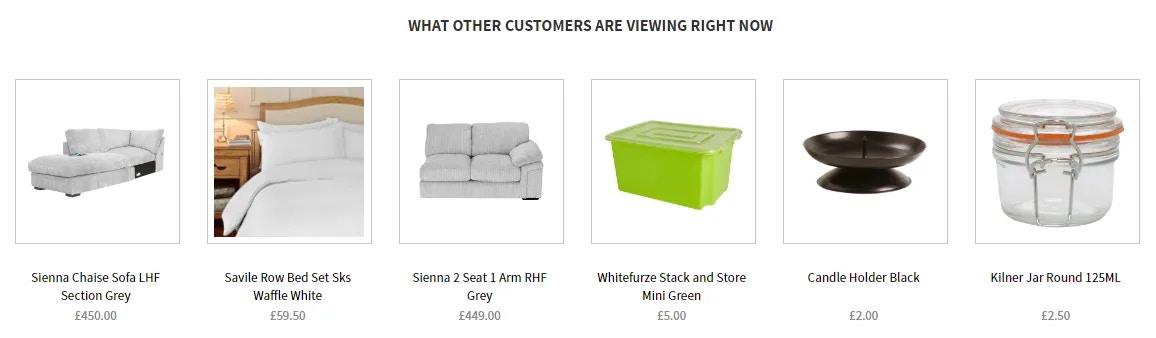 Campaigns determine what content appears in zones, when it appears, and who sees it. Zones are simply the containers where this personalized content is displayed.
## Zone Limitations and Performance
* **Maximum 8 zones per page** to maintain optimal site performance
* **Multiple zones per page type** supported (e.g., header, sidebar, footer zones on product pages)
* **Cross-page consistency** - zones can appear on multiple page types with different content
## Zone Content Types
PureClarity supports various content types within zones:
### AI-Powered Content
* **AI Recommender** - PureClarity's algorithms automatically select optimal recommendation strategies
* **Automated personalization** based on customer behavior and preferences
### Manual Content
* **Manual Recommender** - Hand-curated product selections
* **Banner Images** - Single promotional images for special offers
* **Carousel** - Customizable image slideshows
* **HTML Content** - Custom HTML for maximum flexibility
* **Custom Content Types** - Create unique content formats for specific needs
Start with AI Recommenders to leverage PureClarity's machine learning capabilities, then add manual content for specific promotional campaigns.
## Page Type Coverage
Zones can be placed on over 19 predefined page types:
### E-commerce Pages
* Homepage
* Product Pages
* Category Pages
* Search Results
* Basket/Cart Page
* Checkout Pages
### Customer Experience Pages
* My Account
* Order Confirmation
* My Recommendations
* Custom landing pages
Campaigns determine what content appears in zones, when it appears, and who sees it. Zones are simply the containers where this personalized content is displayed.
## Zone Limitations and Performance
* **Maximum 8 zones per page** to maintain optimal site performance
* **Multiple zones per page type** supported (e.g., header, sidebar, footer zones on product pages)
* **Cross-page consistency** - zones can appear on multiple page types with different content
## Zone Content Types
PureClarity supports various content types within zones:
### AI-Powered Content
* **AI Recommender** - PureClarity's algorithms automatically select optimal recommendation strategies
* **Automated personalization** based on customer behavior and preferences
### Manual Content
* **Manual Recommender** - Hand-curated product selections
* **Banner Images** - Single promotional images for special offers
* **Carousel** - Customizable image slideshows
* **HTML Content** - Custom HTML for maximum flexibility
* **Custom Content Types** - Create unique content formats for specific needs
Start with AI Recommenders to leverage PureClarity's machine learning capabilities, then add manual content for specific promotional campaigns.
## Page Type Coverage
Zones can be placed on over 19 predefined page types:
### E-commerce Pages
* Homepage
* Product Pages
* Category Pages
* Search Results
* Basket/Cart Page
* Checkout Pages
### Customer Experience Pages
* My Account
* Order Confirmation
* My Recommendations
* Custom landing pages
 You're not limited to predefined page types - zones can appear on any custom page type you define for your specific site structure.
## Zone Placement Strategy
### High-Impact Locations
* **Above the fold** on homepage for maximum visibility
* **Product page sidebars** for cross-sell opportunities
* **Cart page** for upsell recommendations
* **Post-purchase** for related product discovery
### Performance Considerations
* **Mobile responsiveness** - ensure zones work across all devices
* **Load time impact** - balance personalization with site speed
* **User experience** - avoid overwhelming visitors with too many zones
Strategic zone placement is crucial for success. Start with proven high-conversion locations before expanding to experimental placements.
## Getting Started with Zones
Ready to implement zones on your site?
Learn how to create and configure zones in our [Adding Zones](/features/zones/adding-zones) guide.
### Best Practices
1. **Start simple** with 2-3 zones on key pages
2. **Use AI recommendations** initially to gather performance data
3. **Monitor analytics** to identify optimal zone placements
4. **Test different content types** to find what resonates with your audience
5. **Scale gradually** based on performance insights
You're not limited to predefined page types - zones can appear on any custom page type you define for your specific site structure.
## Zone Placement Strategy
### High-Impact Locations
* **Above the fold** on homepage for maximum visibility
* **Product page sidebars** for cross-sell opportunities
* **Cart page** for upsell recommendations
* **Post-purchase** for related product discovery
### Performance Considerations
* **Mobile responsiveness** - ensure zones work across all devices
* **Load time impact** - balance personalization with site speed
* **User experience** - avoid overwhelming visitors with too many zones
Strategic zone placement is crucial for success. Start with proven high-conversion locations before expanding to experimental placements.
## Getting Started with Zones
Ready to implement zones on your site?
Learn how to create and configure zones in our [Adding Zones](/features/zones/adding-zones) guide.
### Best Practices
1. **Start simple** with 2-3 zones on key pages
2. **Use AI recommendations** initially to gather performance data
3. **Monitor analytics** to identify optimal zone placements
4. **Test different content types** to find what resonates with your audience
5. **Scale gradually** based on performance insights