> ## Documentation Index
> Fetch the complete documentation index at: https://docs.pureclarity.com/llms.txt
> Use this file to discover all available pages before exploring further.
# BigCommerce Configuration
> Complete configuration guide for BigCommerce PureClarity integration including data synchronization, Stencil theme setup, and zone installation
## What the Application Does
The PureClarity BigCommerce application will integrate your shop with PureClarity. It will:
1. **Automatically synchronize your shop data** with PureClarity so that it can provide personalized merchandising. This includes your products, brands, categories, orders and customers.
2. **Add the PureClarity template** into your Stencil themes. Templates and Themes are discussed in more detail below.
3. **Add a script to your site** that tracks your customers activity and will display personalized content in your PureClarity Zones.
## What You Need to Do
Once you have installed the application, your store needs to synchronize with PureClarity. This process will start automatically after the application is installed onto your site.
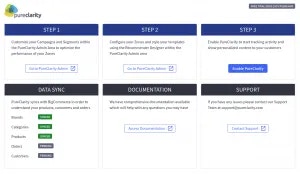 During this process the application UI will update you with the status of the synchronization. You may leave the application and come back later if required.
The initial synchronization process may take several minutes depending on the size of your product catalog and customer database.
### Enabling PureClarity
Finally, enable PureClarity by pressing the **Enable** button. This will add our script to your site, and PureClarity will begin to show personalized content.
We recommend enabling PureClarity during off-peak hours to monitor the initial performance and ensure everything is working correctly.
## Stencil Themes
### What the Plugin Does
PureClarity installs a PureClarity zone into several regions in all the Stencil themes on your site. The regions are:
#### Automatic Zone Installation
The following zones are automatically added to your theme:
1. **Homepage (pages/home)**
* **HP-01** and **HP-02** will be added into the region `home_below_carousel`
2. **Product Pages (pages/product)**
* **PP-01** and **PP-02** will be added into the region `product_below_content`
3. **Category Pages (pages/category)**
* **CP-01** and **CP-02** will be added into the region `category_below_content`
4. **Search Pages (pages/search)**
* **SP-01** and **SP-02** will be added into the region `search_below_content`
5. **Cart Pages (pages/cart)**
* **BP-01** and **BP-02** will be added into the region `header_bottom`
These zones are strategically placed to maximize engagement and conversion opportunities throughout the customer journey.
### Zone Configuration
Each zone can be configured independently in the PureClarity admin console to show:
* Product recommendations
* Category recommendations
* Promotional banners
* Personalized content
* Search-driven recommendations
### Theme Compatibility
The PureClarity BigCommerce app is designed to work with all Stencil themes. The zones are inserted using BigCommerce's standard template regions, ensuring compatibility across different theme designs.
If you have a heavily customized theme, you may want to test the zone placements to ensure they integrate well with your design.
## Data Synchronization
### Automatic Sync Features
PureClarity automatically synchronizes the following data from your BigCommerce store:
* **Products**: Including prices, descriptions, images, and inventory status
* **Categories**: Category structure and metadata
* **Brands**: Brand information and associations
* **Customers**: Customer profiles and behavior data
* **Orders**: Purchase history and transaction details
### Sync Frequency
* **Real-time updates**: Product changes, inventory updates
* **Daily sync**: Complete data refresh
* **Order sync**: Immediate upon order completion
## Uninstall
### How to Uninstall the Application
Uninstall the PureClarity app from your BigCommerce admin, just like any other BigCommerce app.
Please note that once the app is uninstalled your PureClarity account will be deleted and any data collected will be permanently removed. This includes all data synchronized with PureClarity and all data collected during the time the app was enabled.
### Before Uninstalling
If you're considering uninstalling:
1. **Export any important data** from your PureClarity admin console
2. **Download reports** you may need for future reference
3. **Contact support** at [support@pureclarity.com](mailto:support@pureclarity.com) if you're experiencing issues - we may be able to help resolve them
### Data Retention
After uninstalling:
* All PureClarity zones will be removed from your theme
* Customer tracking will stop immediately
* All personalization features will be disabled
* Your PureClarity account and data will be permanently deleted within 24 hours
If you're temporarily disabling PureClarity, consider using the "Disable" feature in the app settings instead of uninstalling, which preserves your data and configuration.
During this process the application UI will update you with the status of the synchronization. You may leave the application and come back later if required.
The initial synchronization process may take several minutes depending on the size of your product catalog and customer database.
### Enabling PureClarity
Finally, enable PureClarity by pressing the **Enable** button. This will add our script to your site, and PureClarity will begin to show personalized content.
We recommend enabling PureClarity during off-peak hours to monitor the initial performance and ensure everything is working correctly.
## Stencil Themes
### What the Plugin Does
PureClarity installs a PureClarity zone into several regions in all the Stencil themes on your site. The regions are:
#### Automatic Zone Installation
The following zones are automatically added to your theme:
1. **Homepage (pages/home)**
* **HP-01** and **HP-02** will be added into the region `home_below_carousel`
2. **Product Pages (pages/product)**
* **PP-01** and **PP-02** will be added into the region `product_below_content`
3. **Category Pages (pages/category)**
* **CP-01** and **CP-02** will be added into the region `category_below_content`
4. **Search Pages (pages/search)**
* **SP-01** and **SP-02** will be added into the region `search_below_content`
5. **Cart Pages (pages/cart)**
* **BP-01** and **BP-02** will be added into the region `header_bottom`
These zones are strategically placed to maximize engagement and conversion opportunities throughout the customer journey.
### Zone Configuration
Each zone can be configured independently in the PureClarity admin console to show:
* Product recommendations
* Category recommendations
* Promotional banners
* Personalized content
* Search-driven recommendations
### Theme Compatibility
The PureClarity BigCommerce app is designed to work with all Stencil themes. The zones are inserted using BigCommerce's standard template regions, ensuring compatibility across different theme designs.
If you have a heavily customized theme, you may want to test the zone placements to ensure they integrate well with your design.
## Data Synchronization
### Automatic Sync Features
PureClarity automatically synchronizes the following data from your BigCommerce store:
* **Products**: Including prices, descriptions, images, and inventory status
* **Categories**: Category structure and metadata
* **Brands**: Brand information and associations
* **Customers**: Customer profiles and behavior data
* **Orders**: Purchase history and transaction details
### Sync Frequency
* **Real-time updates**: Product changes, inventory updates
* **Daily sync**: Complete data refresh
* **Order sync**: Immediate upon order completion
## Uninstall
### How to Uninstall the Application
Uninstall the PureClarity app from your BigCommerce admin, just like any other BigCommerce app.
Please note that once the app is uninstalled your PureClarity account will be deleted and any data collected will be permanently removed. This includes all data synchronized with PureClarity and all data collected during the time the app was enabled.
### Before Uninstalling
If you're considering uninstalling:
1. **Export any important data** from your PureClarity admin console
2. **Download reports** you may need for future reference
3. **Contact support** at [support@pureclarity.com](mailto:support@pureclarity.com) if you're experiencing issues - we may be able to help resolve them
### Data Retention
After uninstalling:
* All PureClarity zones will be removed from your theme
* Customer tracking will stop immediately
* All personalization features will be disabled
* Your PureClarity account and data will be permanently deleted within 24 hours
If you're temporarily disabling PureClarity, consider using the "Disable" feature in the app settings instead of uninstalling, which preserves your data and configuration.