> ## Documentation Index
> Fetch the complete documentation index at: https://docs.pureclarity.com/llms.txt
> Use this file to discover all available pages before exploring further.
# Magento 2.x - Troubleshooting Feed Failures
> Comprehensive guide to diagnosing and resolving PureClarity data feed errors in Magento 2.x
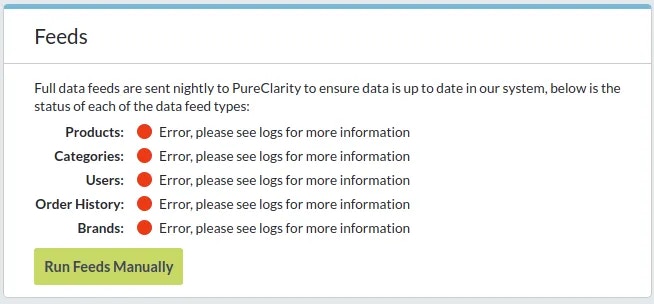
When your PureClarity data feeds are failing, the feeds box on your dashboard will display error status like this:
 Feed failures prevent your store data from synchronizing with PureClarity, which can impact recommendation accuracy and personalization features.
## Error Investigation Steps
When you encounter feed errors, check the following locations for detailed error information:
### Server-Level Logs
* **Web server logs**: `/var/log/nginx/` or `/var/log/httpd/` on your filesystem
* **Magento logs**: `/var/log/` directory
### Database-Level Diagnostics
* **Cron schedule table**: Check the `cron_schedule` table for errors in rows with `job_code = "pureclarity_core_scheduled_feed"`
* **PureClarity state table**: Examine the `pureclarity_state` table for the value in the row where `name = "last_feed_error"`
### Enhanced Logging (Version 6.1.0+)
If you're running PureClarity extension version 6.1.0 or later, you can access centralized logs through the [PureClarity Logs page](/integrations/magento/magento-2/logs) instead of manually checking the locations above.
## Common Resolution Steps
### 1. Check System Requirements
Ensure your Magento installation meets all PureClarity requirements:
* PHP memory limits
* Database connection stability
* Cron job configuration
### 2. Verify Cron Configuration
Feed processes rely on Magento's cron system:
```bash theme={null}
# Check if cron is running
php bin/magento cron:run
# Verify cron configuration
php bin/magento cron:status
```
### 3. Manual Feed Execution
Try running feeds manually to isolate the issue:
1. Navigate to **PureClarity > Dashboard** in Magento admin
2. Use the manual feed buttons in the Feeds section
3. Monitor for immediate errors
### 4. Database Connectivity
Verify PureClarity can communicate with external services:
* Check firewall settings
* Confirm outbound HTTPS connectivity
* Validate API credentials
## Getting Additional Help
If errors persist after following these steps:
[Contact PureClarity Support](/support/general/support-policy) with the following information:
* Error messages from logs
* Extension version number
* Magento version
* Recent changes to your store configuration
Enable debug mode temporarily to capture more detailed error information, but remember to disable it on production sites for security and performance reasons.
Feed failures prevent your store data from synchronizing with PureClarity, which can impact recommendation accuracy and personalization features.
## Error Investigation Steps
When you encounter feed errors, check the following locations for detailed error information:
### Server-Level Logs
* **Web server logs**: `/var/log/nginx/` or `/var/log/httpd/` on your filesystem
* **Magento logs**: `/var/log/` directory
### Database-Level Diagnostics
* **Cron schedule table**: Check the `cron_schedule` table for errors in rows with `job_code = "pureclarity_core_scheduled_feed"`
* **PureClarity state table**: Examine the `pureclarity_state` table for the value in the row where `name = "last_feed_error"`
### Enhanced Logging (Version 6.1.0+)
If you're running PureClarity extension version 6.1.0 or later, you can access centralized logs through the [PureClarity Logs page](/integrations/magento/magento-2/logs) instead of manually checking the locations above.
## Common Resolution Steps
### 1. Check System Requirements
Ensure your Magento installation meets all PureClarity requirements:
* PHP memory limits
* Database connection stability
* Cron job configuration
### 2. Verify Cron Configuration
Feed processes rely on Magento's cron system:
```bash theme={null}
# Check if cron is running
php bin/magento cron:run
# Verify cron configuration
php bin/magento cron:status
```
### 3. Manual Feed Execution
Try running feeds manually to isolate the issue:
1. Navigate to **PureClarity > Dashboard** in Magento admin
2. Use the manual feed buttons in the Feeds section
3. Monitor for immediate errors
### 4. Database Connectivity
Verify PureClarity can communicate with external services:
* Check firewall settings
* Confirm outbound HTTPS connectivity
* Validate API credentials
## Getting Additional Help
If errors persist after following these steps:
[Contact PureClarity Support](/support/general/support-policy) with the following information:
* Error messages from logs
* Extension version number
* Magento version
* Recent changes to your store configuration
Enable debug mode temporarily to capture more detailed error information, but remember to disable it on production sites for security and performance reasons.