> ## Documentation Index
> Fetch the complete documentation index at: https://docs.pureclarity.com/llms.txt
> Use this file to discover all available pages before exploring further.
# Data Explorers Overview
> Comprehensive guide to PureClarity's data exploration tools for analyzing product performance, user behavior, and gaining insights for optimization
The data explorers allow you to take a deep dive into the data inside PureClarity and help you judge the performance of PureClarity, understand what your customers are doing and give you ideas about how to maximize the personalization experience.
 ## Available Explorers
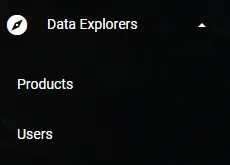
There are 2 main explorers available in PureClarity:
### 1. Product Explorer
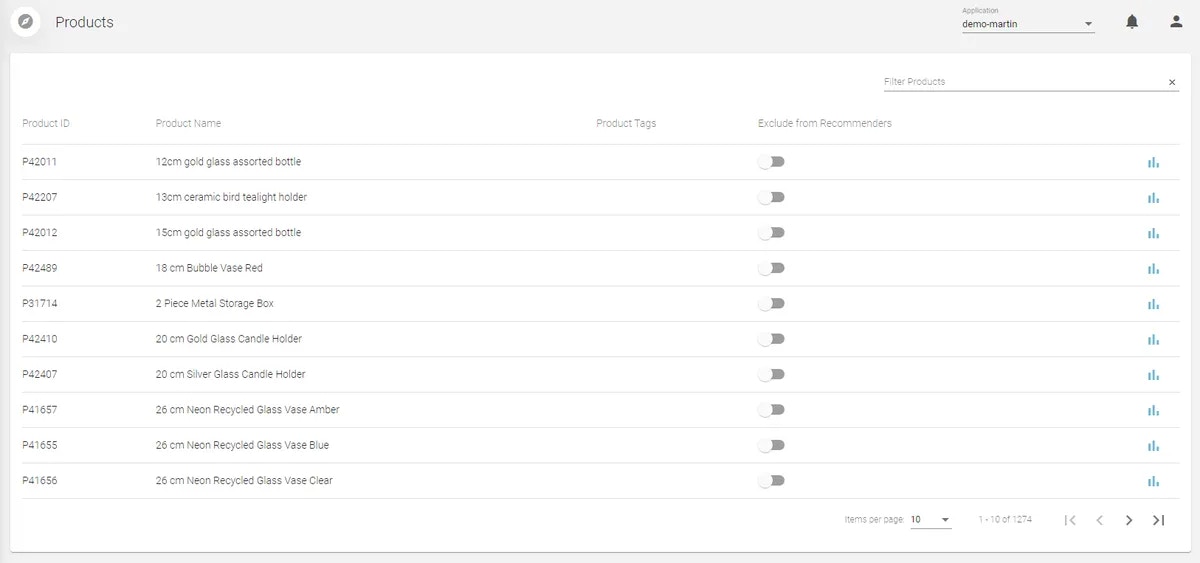
View a product's performance, popularity, related purchases & viewings and conversion rate.
## Available Explorers
There are 2 main explorers available in PureClarity:
### 1. Product Explorer
View a product's performance, popularity, related purchases & viewings and conversion rate.
 **Key Features:**
* **Performance Metrics**: Track how individual products are performing
* **Popularity Analysis**: See which products are trending and engaging customers
* **Related Purchases**: Understand what products are bought together
* **Related Viewings**: Analyze which products are viewed in the same sessions
* **Conversion Rates**: Monitor how well products convert browsers into buyers
### 2. User Explorer
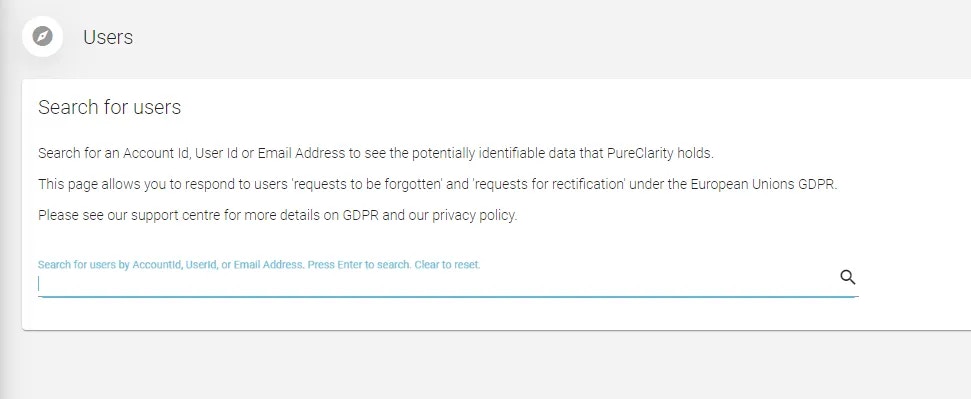
The User Explorer shows what is held about a user and also gives you privacy tools to comply with GDPR.
**Key Features:**
* **Performance Metrics**: Track how individual products are performing
* **Popularity Analysis**: See which products are trending and engaging customers
* **Related Purchases**: Understand what products are bought together
* **Related Viewings**: Analyze which products are viewed in the same sessions
* **Conversion Rates**: Monitor how well products convert browsers into buyers
### 2. User Explorer
The User Explorer shows what is held about a user and also gives you privacy tools to comply with GDPR.
 **Key Features:**
* **User Profiles**: View comprehensive customer data and behavior patterns
* **Privacy Compliance**: GDPR tools for data management and user rights
* **Behavior Analysis**: Understand individual customer journeys
* **Segmentation Insights**: See which segments users belong to
* **Data Management**: Tools for handling user data requests
For detailed information about the User Explorer, see our [User Explorer](/support/general/user-explorer) article.
## Product Explorer Deep Dive
### Performance Analytics
**Conversion Metrics:**
* View-to-purchase conversion rates
* Add-to-cart rates
* Revenue attribution
* Performance trends over time
**Popularity Indicators:**
* Page view counts
* Time spent on product pages
* Click-through rates from recommendations
* Search result rankings
### Relationship Analysis
**Product Affinity:**
* **Frequently Bought Together**: Products that are purchased in the same order
* **Frequently Viewed Together**: Products viewed in the same session
* **Cross-sell Opportunities**: Related products that drive additional sales
* **Upsell Potential**: Higher-value alternatives customers consider
### Strategic Insights
**Optimization Opportunities:**
* Identify underperforming products that need attention
* Discover high-potential products for promotion
* Find products that work well as recommendations
* Analyze seasonal performance patterns
Use Product Explorer insights to optimize your product positioning, pricing strategies, and recommendation campaigns.
## User Explorer Deep Dive
### Customer Profiles
**Behavioral Data:**
* Browsing history and patterns
* Purchase history and preferences
* Interaction with campaigns and recommendations
* Session duration and engagement metrics
**Segmentation Data:**
* Which segments the user belongs to
* Segment behavior patterns
* Personalization targeting criteria
* Campaign engagement history
### Privacy and Compliance
**GDPR Tools:**
* **Data Export**: Generate comprehensive user data reports
* **Data Deletion**: Remove user data upon request
* **Consent Management**: Track and manage user consent preferences
* **Access Rights**: Provide users with their stored data
**Privacy Features:**
* **Anonymization Options**: Remove personally identifiable information
* **Data Retention Controls**: Manage how long data is stored
* **Audit Trails**: Track data access and modifications
* **Compliance Reporting**: Generate reports for regulatory requirements
Always ensure you're following applicable privacy laws and regulations when using customer data for analysis and personalization.
## Using Data Explorers for Optimization
### Performance Analysis
**Regular Monitoring:**
* Weekly performance reviews of top products
* Monthly analysis of user behavior trends
* Seasonal pattern identification
* Campaign performance correlation
**Actionable Insights:**
* Identify products that need better positioning
* Find opportunities for new product recommendations
* Discover gaps in your personalization strategy
* Optimize user journey touchpoints
### Strategic Decision Making
**Product Strategy:**
* **Inventory Management**: Focus on high-performing products
* **Pricing Optimization**: Analyze conversion rates vs. price points
* **Category Performance**: Understand which categories drive engagement
* **New Product Launches**: Learn from successful product patterns
**Customer Strategy:**
* **Segmentation Refinement**: Create more targeted customer groups
* **Personalization Enhancement**: Improve recommendation accuracy
* **Campaign Optimization**: Target campaigns based on user insights
* **Retention Strategies**: Identify and address churn risk factors
## Best Practices
### Regular Analysis
**Frequency Recommendations:**
* **Daily**: Monitor key performance indicators
* **Weekly**: Review product performance trends
* **Monthly**: Conduct comprehensive user behavior analysis
* **Quarterly**: Strategic review and optimization planning
### Data-Driven Decisions
**Analysis Framework:**
1. **Identify Patterns**: Look for trends and anomalies in the data
2. **Form Hypotheses**: Develop theories about what the data means
3. **Test Assumptions**: Use A/B testing to validate insights
4. **Implement Changes**: Apply learnings to optimization strategies
5. **Measure Results**: Track the impact of your changes
Combine insights from both Product and User Explorers to get a complete picture of your ecommerce performance and optimization opportunities.
## Integration with Other Features
### Campaign Enhancement
Use explorer insights to:
* **Target Campaigns**: Create more effective customer segments
* **Product Selection**: Choose products with proven performance
* **Timing Optimization**: Launch campaigns when engagement is highest
* **Performance Prediction**: Estimate campaign success based on historical data
### Analytics Correlation
Connect explorer data with:
* **Overall Analytics**: See how individual insights fit into broader trends
* **Revenue Attribution**: Understand how product performance impacts revenue
* **Customer Lifetime Value**: Analyze long-term customer behavior patterns
* **ROI Measurement**: Calculate return on personalization investments
## Getting Started
To maximize the value of Data Explorers:
1. **Start with Product Explorer**: Identify your top and bottom performing products
2. **Analyze User Patterns**: Use User Explorer to understand customer behavior
3. **Look for Correlations**: Find relationships between product and user data
4. **Create Action Plans**: Develop strategies based on your findings
5. **Monitor Changes**: Track the impact of your optimization efforts
Data Explorers are powerful tools for understanding your business, but they're most effective when used as part of a comprehensive analytics and optimization strategy.
**Key Features:**
* **User Profiles**: View comprehensive customer data and behavior patterns
* **Privacy Compliance**: GDPR tools for data management and user rights
* **Behavior Analysis**: Understand individual customer journeys
* **Segmentation Insights**: See which segments users belong to
* **Data Management**: Tools for handling user data requests
For detailed information about the User Explorer, see our [User Explorer](/support/general/user-explorer) article.
## Product Explorer Deep Dive
### Performance Analytics
**Conversion Metrics:**
* View-to-purchase conversion rates
* Add-to-cart rates
* Revenue attribution
* Performance trends over time
**Popularity Indicators:**
* Page view counts
* Time spent on product pages
* Click-through rates from recommendations
* Search result rankings
### Relationship Analysis
**Product Affinity:**
* **Frequently Bought Together**: Products that are purchased in the same order
* **Frequently Viewed Together**: Products viewed in the same session
* **Cross-sell Opportunities**: Related products that drive additional sales
* **Upsell Potential**: Higher-value alternatives customers consider
### Strategic Insights
**Optimization Opportunities:**
* Identify underperforming products that need attention
* Discover high-potential products for promotion
* Find products that work well as recommendations
* Analyze seasonal performance patterns
Use Product Explorer insights to optimize your product positioning, pricing strategies, and recommendation campaigns.
## User Explorer Deep Dive
### Customer Profiles
**Behavioral Data:**
* Browsing history and patterns
* Purchase history and preferences
* Interaction with campaigns and recommendations
* Session duration and engagement metrics
**Segmentation Data:**
* Which segments the user belongs to
* Segment behavior patterns
* Personalization targeting criteria
* Campaign engagement history
### Privacy and Compliance
**GDPR Tools:**
* **Data Export**: Generate comprehensive user data reports
* **Data Deletion**: Remove user data upon request
* **Consent Management**: Track and manage user consent preferences
* **Access Rights**: Provide users with their stored data
**Privacy Features:**
* **Anonymization Options**: Remove personally identifiable information
* **Data Retention Controls**: Manage how long data is stored
* **Audit Trails**: Track data access and modifications
* **Compliance Reporting**: Generate reports for regulatory requirements
Always ensure you're following applicable privacy laws and regulations when using customer data for analysis and personalization.
## Using Data Explorers for Optimization
### Performance Analysis
**Regular Monitoring:**
* Weekly performance reviews of top products
* Monthly analysis of user behavior trends
* Seasonal pattern identification
* Campaign performance correlation
**Actionable Insights:**
* Identify products that need better positioning
* Find opportunities for new product recommendations
* Discover gaps in your personalization strategy
* Optimize user journey touchpoints
### Strategic Decision Making
**Product Strategy:**
* **Inventory Management**: Focus on high-performing products
* **Pricing Optimization**: Analyze conversion rates vs. price points
* **Category Performance**: Understand which categories drive engagement
* **New Product Launches**: Learn from successful product patterns
**Customer Strategy:**
* **Segmentation Refinement**: Create more targeted customer groups
* **Personalization Enhancement**: Improve recommendation accuracy
* **Campaign Optimization**: Target campaigns based on user insights
* **Retention Strategies**: Identify and address churn risk factors
## Best Practices
### Regular Analysis
**Frequency Recommendations:**
* **Daily**: Monitor key performance indicators
* **Weekly**: Review product performance trends
* **Monthly**: Conduct comprehensive user behavior analysis
* **Quarterly**: Strategic review and optimization planning
### Data-Driven Decisions
**Analysis Framework:**
1. **Identify Patterns**: Look for trends and anomalies in the data
2. **Form Hypotheses**: Develop theories about what the data means
3. **Test Assumptions**: Use A/B testing to validate insights
4. **Implement Changes**: Apply learnings to optimization strategies
5. **Measure Results**: Track the impact of your changes
Combine insights from both Product and User Explorers to get a complete picture of your ecommerce performance and optimization opportunities.
## Integration with Other Features
### Campaign Enhancement
Use explorer insights to:
* **Target Campaigns**: Create more effective customer segments
* **Product Selection**: Choose products with proven performance
* **Timing Optimization**: Launch campaigns when engagement is highest
* **Performance Prediction**: Estimate campaign success based on historical data
### Analytics Correlation
Connect explorer data with:
* **Overall Analytics**: See how individual insights fit into broader trends
* **Revenue Attribution**: Understand how product performance impacts revenue
* **Customer Lifetime Value**: Analyze long-term customer behavior patterns
* **ROI Measurement**: Calculate return on personalization investments
## Getting Started
To maximize the value of Data Explorers:
1. **Start with Product Explorer**: Identify your top and bottom performing products
2. **Analyze User Patterns**: Use User Explorer to understand customer behavior
3. **Look for Correlations**: Find relationships between product and user data
4. **Create Action Plans**: Develop strategies based on your findings
5. **Monitor Changes**: Track the impact of your optimization efforts
Data Explorers are powerful tools for understanding your business, but they're most effective when used as part of a comprehensive analytics and optimization strategy.