
Before setting up your account, ensure you have the PureClarity WooCommerce plugin installed and activated. You’ll need admin access to your WordPress/WooCommerce site.
Creating a New Account
When you click on the PureClarity menu and haven’t signed up yet, you’ll see the signup form: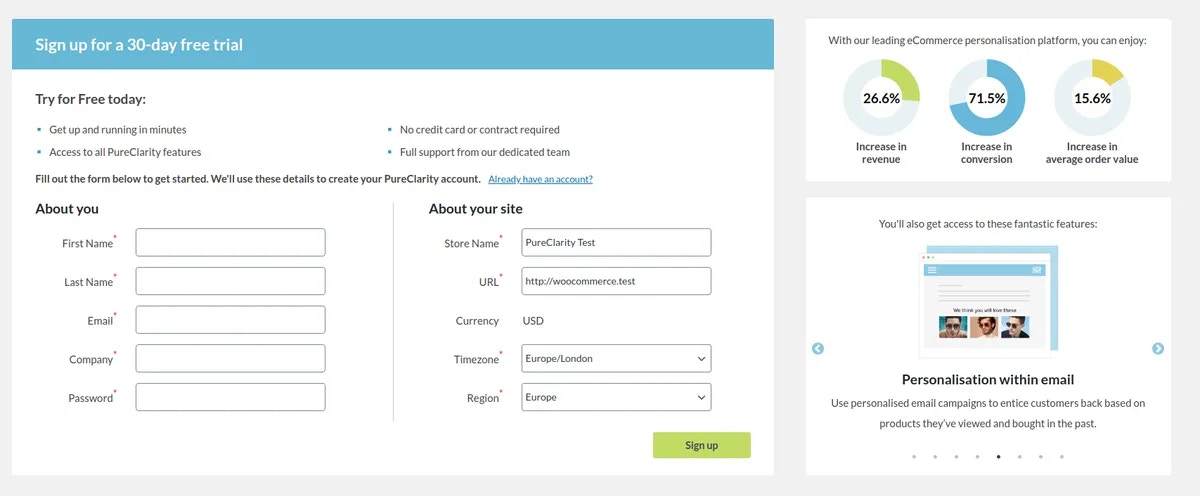
- Store Name - Your business/store name
- Email Address - Your business email
- First & Last Name - Your contact details
- Phone Number - For account verification
- Country - Your business location
Account Processing
When you submit the form:- Request submitted - Your details are sent to PureClarity for processing
- Processing time - Usually completed within a couple of minutes
- Automatic configuration - If you stay on the waiting page, your WooCommerce site will be configured automatically
- Background setup - If you navigate away, a background process will complete the configuration
Linking an Existing Account
If you already have a PureClarity account, click the “Link existing account” option above the signup form: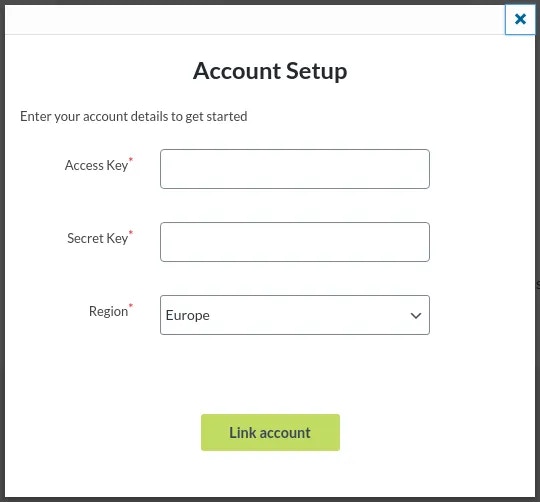
Required Credentials
You’ll need the following keys from your existing PureClarity account:- AccessKey - Your unique access identifier
- SecretKey - Your secure authentication key
Finding Your Keys
To locate your keys:- Log into your PureClarity Admin
- Navigate to My Account > Integration
- Copy your AccessKey and SecretKey
- Select your region (USA / Europe / UK)
Your region selection must match where your PureClarity application is hosted for proper connectivity.
Next Steps
After successful account setup or linking:- Configure your WooCommerce zones
- Set up data feeds
- Review dashboard overview
- Explore plugin settings
Troubleshooting
If you encounter issues during setup:- Verify your internet connection
- Check that the plugin is properly activated
- Ensure your email address is valid and accessible
- Contact support@pureclarity.com if problems persist